
Index

The green interface allows to create, distribute, manage and access ELNs of multiple users.
These ELNs can be on local computers and on a network (with or without VPN configuration).
There is no limit on the number of ELNs to be created and accessed from a single computer.
There is no limit on the types of connection (simultaneous access to networked and local
ELNs is possible).
 ADDING A NEW USER (CREATING A NEW ELN)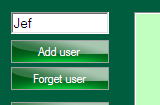
To create a new user with default ELN profile: a user name should be entered to the text field.
The "Add user" button will open a folder browser for selecting desired ELN location
(local or network location can be used).
To create a new user with pre-configured ELN profile: it is possible to deploy ELNs with
pre-configured settings. To do this, follow the same steps as above and select "Yes" in the
dialogue asking whether you would like to deploy a pre-configured ELN. Read and follow
the prompts that appear.
Access restrictions: access restrictions are easy to set up and should be managed on the server
side, outside of this ELN software.
For example:
User A and user B are collaborating and share an ELN.
User C is collaborating with A but is not permitted to view ELN of user B.
In this scenario, users create 2 different folders with the following access rights:
A+B, not C
C+A, not B
and set up an ELN in each of these folders. Done.
In addition, users A, B, and C may each run a second ELN in a private non-shared space
and another ELN shared by all of them.
A single ELN license is sufficient to run many ELNs (on one computer).
Encryption: although it is possible to run encrypted ELNs over network, it is highly recommended to
use encryption only on ELNs that are configured on your local hard drive. Any networking activity
with encrypted ELN is unsafe.
 ADDING AN EXISTING ELN TO YOUR USER LIST
To add an existing user: click "Add user" and navigate to an existing ELN folder of another user.
If you have access to that user's directory, the added ELN will be instantly available.